
Your mobile-equipped trade-show booth is flush with stacks of handouts imprinted with QR codes, video download URLs and invites to win giveaways via Twitter. This trade show is going to rock! Then you realize the Internet connection is spotty or doesn’t work at all.
Suddenly, you remember you have your mobile USB card in your bag. Scoot over to your computer and set up that Wi-Fi hotspot on a Mac in 10 simple steps.
- Plug in and connect to your USB modem card.
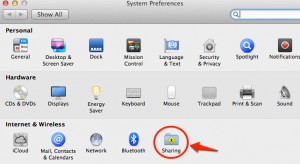
- Choose “System Preferences.”
 Open “Sharing Folder.”
- Click on “Internet Sharing” (but don’t check the box).
- Click “Share our connection from” and choose your mobile Internet provider.
- Check mark the Wi-Fi box.
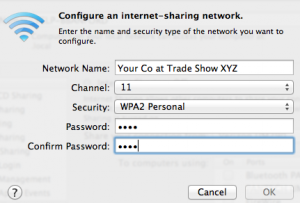
- Click on “Wi-Fi Options.”
- Create a relevant network name and simple password for your customers.
 Check mark “Internet Sharing” and click start.
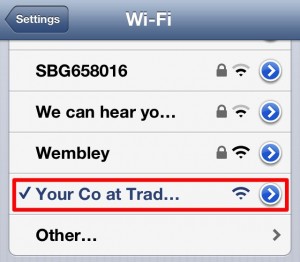
- Open your mobile device “Settings app” to connect to your newly created Wi-Fi network.
Behold the Internet connection! Now those nifty QR codes printed on your brochures and handouts can put some marketing muscle into your trade-show exhibit.